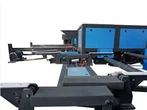
Description of Functions
1 Cutting of steel strips: put in the steel strips from the equipment entrance, step on the cutting foot switch until the cutter rises to the highest point, then release the foot switch. The tool automatically returns to its original position.
2 Welding compression
Step on the left clamp foot switch, put the right steel strip into the welding entrance, then use the left clamp plate and the locating block to control the verticality of the right steel strip. After alignment, step on the right clamp foot switch so that the right steel strip is tightened. Step on the left clamp foot switch to return it to the original position, put the left steel strip into the welding entrance, use the right clamp plate and the locating block to control the verticality of the left steel strip. After alignment, step on the left clamp foot switch so that the left and right steel strips are aligned. If the alignment effect is not very good, repeat the operations again to ensure the welding effect.
3 Control Panel
The control panel of this machine has the Siemens touch screen, an emergency stop button, an oil pump start button, an oil pump stop button, an oil pump indicator light and a welding indicator light. When the machine is cutting, click the oil pump start button, the oil pump indicator light turns on and the hydraulic station starts to cut. After the welding work is completed, click the oil pump stop button, the hydraulic station stops working.
4 Introduction to Operation Interface
After the Siemens touch screen is turned on, an automatic control interface will appear. Click the Chinese and English buttons on this interface to switch the language between Chinese and English. The left clamp indicator light turns green when the left clamp is pressed during welding. The right clamp light turns green when the right clamp is pressed during welding. The forward and backward movement buttons control the ball screw to drive the welding gun to move quickly.